Bot templates
Welcome to the Bot Templates page! On this page you can see a collection of example bot configurations running on several markets. You can copy and customize these templates for your own use.
Configuration Template
This is a configuration template that demonstrates one possible implementation. It is not a recommended strategy or optimal configuration. Users must customize all parameters, test thoroughly, and validate suitability for their own trading objectives and risk tolerance.
Jurisdictional Compliance
You are solely responsible for ensuring your use of this feature complies with all applicable laws and regulations in your jurisdiction. See Jurisdictional Restrictions for details.
What Are Bot Templates?
Bot Templates are pre-configured trading bots that demonstrate typical implementations of various trading strategies. Each template is a configuration example showing how different bot types can be set up for specific markets and use cases.
Templates provide:
- Bot Name - Descriptive name indicating the strategy and market
- Script Type - The HaasScript strategy framework being used
- Market - The trading pair the bot is configured for
- Strategy Category - The type of trading approach (accumulation, market making, risk management, etc.)
Templates serve as starting points for users to understand bot configuration patterns. All template settings should be independently evaluated, tested, and customized before deployment.
How to Clone a Template
Cloning a template creates a new bot with all the original configuration settings:
- Browse the available templates on the Bot Templates page
- Click on the template name or the clone icon:

- In the configuration modal, customize your bot settings:
- Bot Name: Customize the name (or use the default)
- Account: Select which exchange account to use
- Market: Choose the trading pair (pre-selected from template)
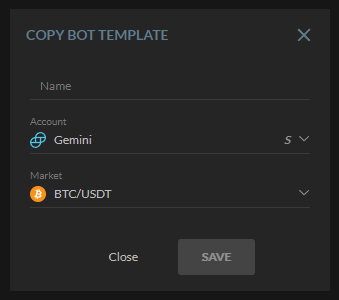
- Click "Save" to create your bot
Your new bot will be created with all the template's settings copied over. You'll be taken to the Bot Setup page where you can review and adjust the configuration before activating it.
Quick Start Alternative
You can also clone templates directly from the Create Bot page by clicking the "Browse Templates →" button in the Quick Start banner.
Setting up and running a bot
Once you've copied/cloned a bot, it's very important you set up the bot before running it. One of the things you really must do is set up the trade amount the bot is supposed to use. Once you've done this, you can start the bot.