Execute trade
In the HaasOnline TradeServer, you will always be able to perform manual trades via Execute Trade widget on any of the accounts that you have connected to the platform.
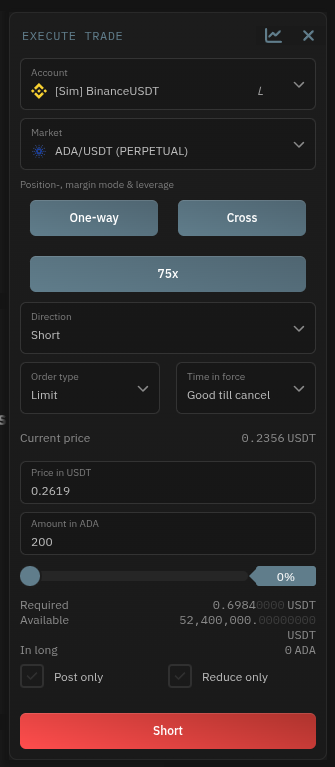
By clicking on the  icon you will be able to:
- Open the market on
Marketviewby clicking on
- Selecting the
Accountto trade from (both Simulated (Paper) and Exchange Accounts are available) - Select the
Marketyou want to trade on - Choose the
Directionyou wish the trade to happen (either Buy/Long or Sell/Short) - Choose the
Order typeof the trade - Change the
Time in forcefor the trade - View the
Current pricefor the market you are going to trade on - Set the
Pricefor your manual trade - Set the
Amountfor your manual trade (the slider directly below it allows you to set the trade in Percentages instead or show you in terms of percentages what the amount of the trade is) - Choose whether or not the order is
Post only
Smart Trade
Turn on the Smart Trade toggle in this panel to add a take profit and stop loss to your trade. See Smart Trade for the full guide.