Tracked spot coins
Spot only. On a spot market, HaasOnline keeps counting the coins a Smart Trade bought, even after you remove its take profit and stop loss, so you can add them back later.
Still counted, not watched
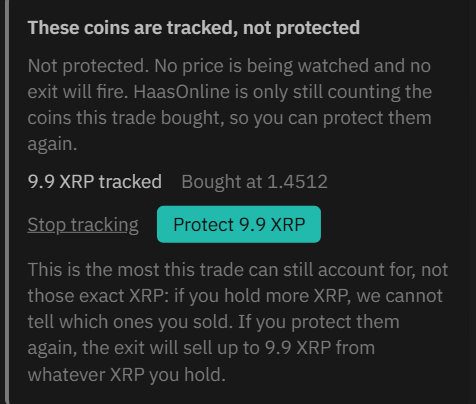
On a spot market, after Remove on a Smart Trade buy that has filled, Order Overview lists the coins under TRACKED, NOT PROTECTED: "1 with no take profit or stop loss, still counted so they can be protected again".

- Each line shows the market, the account, the amount still counted and the price it was bought at, for example 9.9 XRP, Bought at 1.4512.
- No price is being watched and no exit will fire. HaasOnline only keeps count of the coins, so you can protect them again later.
A count, not specific coins
"This is the most this trade can still account for, not those exact coins: if you hold more of the same coin, we cannot tell which ones you sold." If you protect them again, the exit sells up to the tracked amount from whatever coins you hold, including coins you held before.
Protect them again
Open the Execute trade panel on the same account and market. It shows These coins are tracked, not protected, with the amount and the price they were bought at.
- Set your levels in the Smart Trade section, as when opening a trade.
- Click Protect 9.9 XRP (the button shows your amount). The take profit and stop loss are armed straight away: "These coins have a take profit and stop loss again."
- Or click Stop tracking to let the coins go (below).
- The exit will sell up to the tracked amount "from whatever XRP you hold".
With lots switched on, protecting tracked coins again opens a new lot for them, and it can only use coins no other lot claims, for example "A new lot of 4 XRP is 1.5 XRP short: 2.5 XRP are not claimed by another lot." A Buy with New lot picked beside tracked coins says "This buy opens a new lot for the coins it buys. The tracked coins stay as they are."
Or stop tracking them
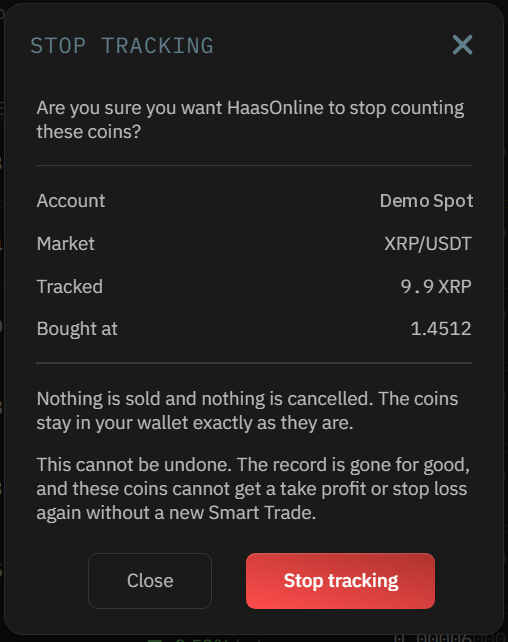
- Click Stop tracking. The window asks: "Are you sure you want HaasOnline to stop counting these coins?"
- "Nothing is sold and nothing is cancelled. The coins stay in your wallet exactly as they are."
- It can't be undone: these coins can't get a take profit or stop loss again without a new Smart Trade.
- Click Stop tracking to confirm. Smart Trade history then shows You stopped tracking.